ChatGPT’s popularity has increased dramatically ever since it first came to public attention. The OpenAI chatbot, which was just released a few months ago, has become so well-known that servers are having trouble keeping up. Although we have already provided the top ChatGPT alternatives, today we will focus on technologies that enhance this AI chatbot’s capability. For you to do just that, we searched the web and identified the top 18 ChatGPT Chrome extensions. Let’s look at the best 5 ChatGPT Chrome extensions without further ado:
1. WebChatGPT
ChatGPT currently needs a crucial component—access to the most recent information on the Internet—in spite of its sage, assured responses and comprehensive database. The responses are no longer relevant for events that occurred after 2021 because ChatGPT only has access to data from that year. WebChatGPT, one of the greatest ChatGPT Chrome extensions, aids in getting around this restriction.
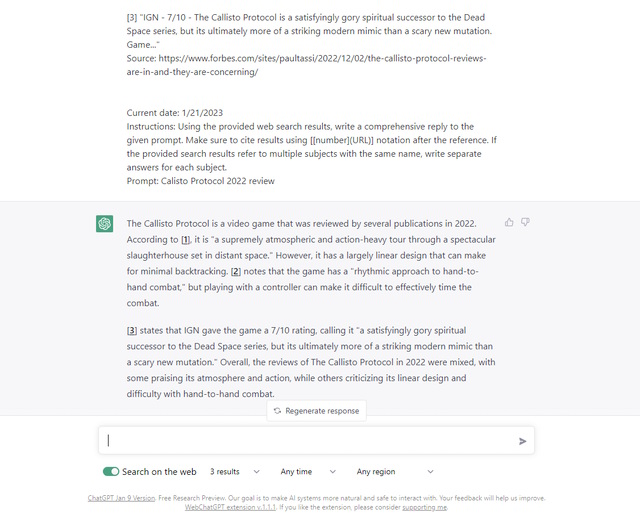
This extension augments the bot so that it adds relevant web results to whatever you ask it. Upon entering a prompt, the extension lets ChatGPT search the web for relevant links. The bot then displays the search results and compiles information based on these links. You can further choose from different filters like time, region, and the number of results. You can even turn off the extension using the toggle to get native ChatGPT functionality back. While the extension does increase the text response size by a few paras, I believe it’s worth it. Though, it only adds to our concerns about plagiarised content.
2. ChatGPT for Google
You are aware that ChatGPT is limited to a single browser tab if you have used this AI chatbot before. Therefore, you must maintain that tab open if you want it available at all times. That issue is resolved and the bot is made available to search engines via this ChatGPT addon. The ChatGPT for Google extension lives up to its name by showing ChatGPT’s response alongside Google search results. Simply use the extension to log into OpenAI to complete the setup process.
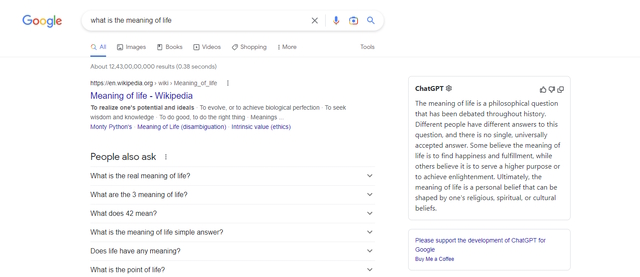
The extension comes alive anytime you’re using Google and doesn’t require any special prompts. To get started, simply search for any topic on Google as you would normally. Replacing the existing knowledge panel on the right, you will see a new ChatGPT panel in its place. This is where ChatGPT renders a response right from your Google search results. Since it treats your search query like a prompt, you don’t need to do anything else. Much like the website, ChatGPT here can provide responses, write code, answer questions, and more.
3. Compose AI
True to its name, the ChatGPT Chrome plugin Compose AI makes it simple for users to send emails by automating every step. The AI may be used without any issues and sits just inside any text field. The composer is most notable for allowing you to write all different kinds of emails. Just enter its shortcode (//), and the menu bar will appear.
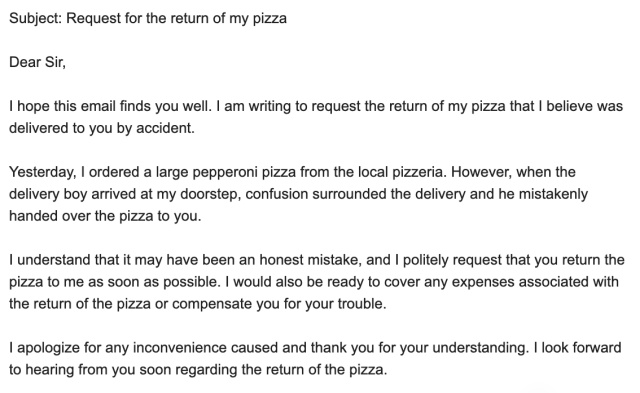
Compose AI provides a plethora of options including the option to write outlines, bullet lists, headlines, paragraphs, sentences, ideas, e-mails, and more. Simply type out your use case and enter. The AI will dish out a neatly worded output in less than 30 seconds and it’s quite nice. Compose AI gives 1,000 words for free after which you can purchase 15,000 words per month for $9.99.
4. TeamSmart AI
While most of these ChatGPT extensions only make use of one or two features, this one accomplishes everything. A complete selection of AI agents created by TeamSmart AI is available to assist users. Each virtual agent has a particular area of expertise that may assist consumers with various needs. Marc, a software engineer, will therefore assist you with questions, and Rose, a mental coach, will support you during difficult times.
However, do note that TeamSmart does require users to input their OpenAI API key. If you’ve read our piece on how to use ChatGPT with Siri, you already know how to do that. For those that don’t, follow the link above. However, once done it’s all smooth sailing. From our use, TeamSmart is actually quite responsive and accurate. Since it’s naturally using ChatGPT, you can expect all the goodness from the chatbot.
5. ChatGPT Writer – Write Mail and Messages with AI
Your browser now has access to ChatGPT Writer’s wordsmithing abilities. The author is concentrating on creating emails and messages for every website. The only requirement to use the extension is to log into OpenAI. The extension must then be opened by clicking on it. After that, it prompts you for information in the context of what you want the email or message to be about. If you’re reacting to a previous exchange, you can give context.
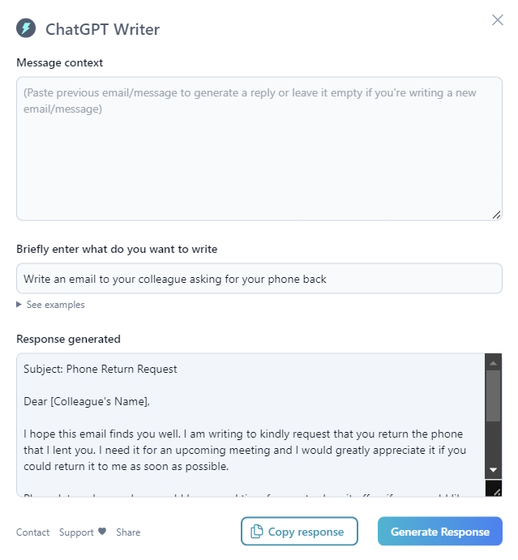
Upon receiving the prompt, the extension dishes out a response almost immediately. While the extension is made for emails and texts, you can use it to actually talk to ChatGPT as well. The responses take longer than usual, but you can do that if you want. Nonetheless, I suggest sticking to its original intention as it is one of the best ChatGPT Chrome extensions for the task.