• Skip to primary navigation
  • Skip to main content
  • Skip to primary sidebar
  • Skip to footer
Trending:
  • Kashmir
  • Elections
Saturday, June 6, 2026

Daily Times

Your right to know

  • HOME
  • Latest
  • Iran-Israel war
  • Gilgit Baltistan Election
  • Pakistan
    • Balochistan
    • Gilgit Baltistan
    • Khyber Pakhtunkhwa
    • Punjab
    • Sindh
  • World
  • Editorials & Opinions
    • Editorials
    • Op-Eds
    • Commentary / Insight
    • Perspectives
    • Cartoons
    • Letters to the Editor
    • Featured
    • Blogs
      • Pakistan
      • World
      • Lifestyle
      • Culture
      • Sports
  • Business
  • Sports
  • E-PAPER
    • Lahore
    • Islamabad
    • Karachi
Farhan Janjua

Farhan Janjua

Farhan Janjua is the Digital Editor, Daily Times. He's been a digital journalist for nearly 10 years now and writes on topics such as pop culture, media gossip, digital media, activism and youth politics. Notable previous associations include Dunya News, FutureChallenges.org by Bertelsmann Foundation, Global Voices and his award-winning blog Guppu.com. He tweets and Instagrams @FarhanJanjua.

How to check if your data was stolen by Cambridge Analytica?

Published on: April 10, 2018 12:13 AM

Facebook has decided to send notifications to all users (including roughly 87 million people) who had their data stolen by the disgraced political firm Cambridge Analytica. On Monday, users started receiving notification prompting them to review the apps and websites they use are linked to Facebook and what kind of information is shared with them. The alert also carries privacy setting button to withdraw permissions you may have previously given to an app or a website.

If you receive a privacy setting notification, don’t freak out just yet without checking it out first. And even if your profile wasn’t hacked, it’s probably a good time to review your privacy settings. But if the alert confirms your data may have been compromised, it will guide you of the steps you need to take as well.

Look at the following screen to know the difference between the two. If your data was not stolen by CA, the alert will look like the screen on the left and if your data has indeed been compromised, it will look like the one on the right.
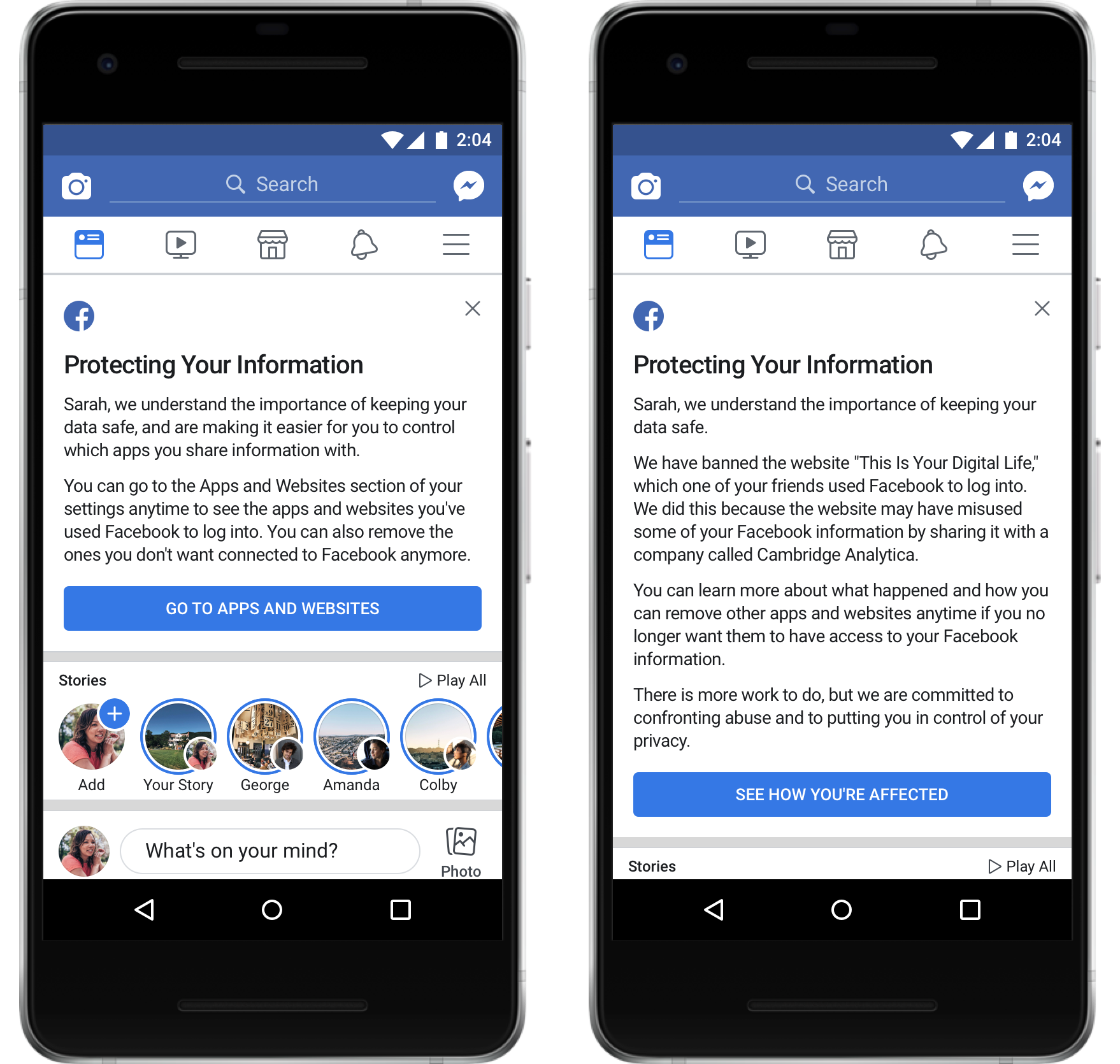
Since 70 million out of the roughly 87 million compromised accounts are of the US users and with over 2.2 billion registered users on Facebook, the odds are in your favour and you will most likely receive the notification as the one on the left.

Facebook has also kicked out two apps that it suspected were abusing users data through their personality quizzes. They are CubeYou and Canadian analytics firm AggregateIQ prompting Canada to launch their own investigation.

If you receive a privacy setting notification, don’t freak out just yet without checking it out first. And even if your profile wasn’t hacked, it’s probably a good time to review your privacy settings

It’s good that Facebook is taking all these steps in the aftermath of the data breach scandal and trying to be transparent but should we continue taking Facebook’s word for it? It’s really a matter of individual personal choice and if you decide to continue using the platform, following keep on reading

Steps you can take to tighten up security around your personal data

1. Review privacy settings and revoke access to shady third party apps especially the ones that are invasive i.e. personality quiz apps. And never give out personal information in quiz apps

2. Use two-factor authorisation on; meaning that in order to login, you have to confirm using your mobile device that it is indeed you and not an intruder trying to gain access

3. Have a strong password that is not easy to predict or break — preferably a different password for each platform — and it should comprise on a combination of letters of both upper and lower cases, numbers and special characters. Make sure you don’t share your password with anyone, remember it instead of writing it anywhere and change it every now and then.

4. Clean up your friends list every now and then and be sure when posting who your intended audience is; friends only, family members only or public

5. Only add people as friends you can trust with your data

6. Double check what you’re saying yes to when accessing your accounts on a mobile device and before giving cross-platform authorisation. Many people unknowingly allow access to their phone/address books to third party apps without knowing what they will do with it.

The writer is the Digital Editor, Daily Times and can be reached at [email protected]. He tweets and instagrams @FarhanJanjua

Published in Daily Times, April 10th 2018.

Filed Under: Featured Tagged With: featured

Submit a Comment


Primary Sidebar


Latest News

Alexander Zverev eases past Jakub Mensik in French Open semifinals

Taylor to face Pili in Croke Park farewell

FIFA bans vuvuzelas from World Cup stadiums

France brush off Ivory Coast loss, call it timely World Cup reminder

Legendary boxer Muhammad Ali’s 10th death anniversary observed

Pakistan

JAAC declared proscribed party ahead of AJK polls on July 27

Fixed tax scheme for small retailers launched to raise Rs 50bn annually

Govt cuts petrol price by Rs 4 per litre, keeps diesel’s unchanged

Bilawal promises GB voters with land and job rights

Iran declares support for Hezbollah with wider peace deal in doubt

More Posts from this Category

Business

SBP’s ‘Go Cashless’ campaign saw Rs 34bn in digital transactions on Eid

Short-term inflation down by 0.56%

Saudi-Pak Business Council shows interest in infrastructure investment

‘Govt, allies united in efforts to craft people-centric budget’

Rupee records gain against US dollar

More Posts from this Category

World

CENTCOM space post signals wider US military footprint

US official delivers Trump’s “good hello” to Putin

NASA lifts ISS evacuation alert after leak

More Posts from this Category


Footer

Home
Lead Stories
Latest News
Editor’s Picks

Culture
Life & Style
Featured
Videos

Editorials
OP-EDS
Commentary
Advertise

Cartoons
Letters
Blogs
Privacy Policy

Contact
Company’s Financials
Investor Information
Terms & Conditions

Facebook
Twitter
Instagram
Youtube

© 2026 Daily Times. All rights reserved.

Manage Consent
To provide the best experiences, we use technologies like cookies to store and/or access device information. Consenting to these technologies will allow us to process data such as browsing behavior or unique IDs on this site. Not consenting or withdrawing consent, may adversely affect certain features and functions.
Functional Always active
The technical storage or access is strictly necessary for the legitimate purpose of enabling the use of a specific service explicitly requested by the subscriber or user, or for the sole purpose of carrying out the transmission of a communication over an electronic communications network.
Preferences
The technical storage or access is necessary for the legitimate purpose of storing preferences that are not requested by the subscriber or user.
Statistics
The technical storage or access that is used exclusively for statistical purposes. The technical storage or access that is used exclusively for anonymous statistical purposes. Without a subpoena, voluntary compliance on the part of your Internet Service Provider, or additional records from a third party, information stored or retrieved for this purpose alone cannot usually be used to identify you.
Marketing
The technical storage or access is required to create user profiles to send advertising, or to track the user on a website or across several websites for similar marketing purposes.
  • Manage options
  • Manage services
  • Manage {vendor_count} vendors
  • Read more about these purposes
View preferences
  • {title}
  • {title}
  • {title}
We use cookies to ensure that we give you the best experience on our website. If you continue to use this site we will assume that you are happy with it.